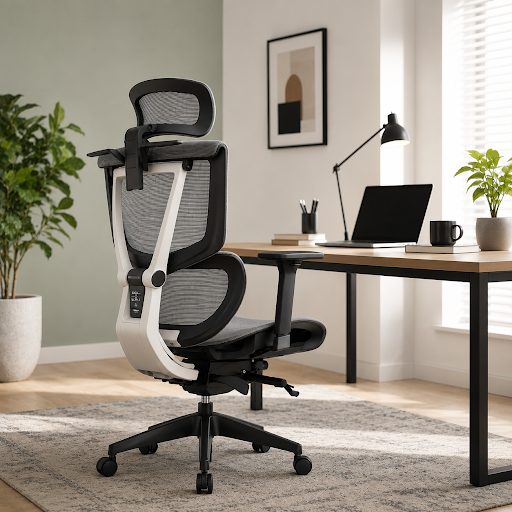
Yes. The right ergonomic computer chair can help reduce work-from-home fatigue by supporting proper posture, reducing pressure on the spine, improving circulation, and minimizing muscle strain. Adjustable features such as lumbar support, seat depth, armrests, and a reclining backrest allow the chair to fit your body, helping you stay comfortable and productive during long hours at your desk.
Key Takeaways
- Ergonomic Support: Adjustable lumbar support and armrests help reduce back, neck, and shoulder strain
- Improved Comfort: Proper seat height, seat depth, and breathable materials make prolonged sitting more comfortable
- Better Productivity: Reduced physical discomfort helps improve focus and minimizes work-from-home fatigue
- Personalized Fit: Multiple adjustment features allow the chair to adapt to different body types and working styles
An average hybrid worker sits for more than six hours a day. An uncomfortable chair drains all your energy while ruining your posture over time. This also affects your productivity. With a highly adjustable ergonomic computer chair that can be tailored to your body and sitting posture, you can reduce strain and stay comfortable throughout the workday.
Work-from-home fatigue is not just about feeling tired. It can also affect your posture, concentration, and overall productivity during long hours at your desk.
This article explores how the right computer chair can help reduce work-from-home fatigue and support better posture during prolonged sitting.
How Does an Uncomfortable Computer Chair Cause Work-From-Home Strain?
Sitting in an uncomfortable computer chair in your home office results in discomfort. The consequences are:
Consistent Muscular Strain: Continuous muscle tension and poor posture can lead to muscle strain and discomfort over time. A poor chair is devoid of a proper lumbar support, which results in the flattening of your spinal curve. Hence, you will hunch or slump forward.
Restricted Blood Flow: Uncomfortable seats press into the back of your thighs and knees. This lowers oxygen-rich blood flow to your extremities. Slouching curves your spine while compressing your chest cavity. This results in decreasing your oxygen intake.
Cognitive Distraction: Discomfort leads to physical symptoms, like eye strain, neck tension, and headache. Constant discomfort diverts your attention from work, making it harder to stay focused and productive throughout the day.
How the Right Chair Deals with Fatigue?
Based on its features, an ergonomic office chair helps you deal with work-from-home discomfort. The key ones are:
Adjustable Lumbar Support
Lumbar support maintains the natural inward curve of your lower spine by filling the gap between your back and the seat. These combats slouching while accounting for an even distribution of your body weight. Hence, you do not experience any back strain.
Modern ergonomic computer chairs often allow the lumbar support to be adjusted vertically and in depth. This makes it easier to position the support exactly where your lower back needs it, reducing discomfort during prolonged sitting sessions.
Adjustable Armrests
When you purchase an ergonomic office chair, you must ensure that it possesses 3D armrests. This feature supports the weight of your arms while helping your shoulders remain relaxed and your wrists properly aligned during computer work. Therefore, you can work for longer hours, and the chance of fatigue is lowered.
With adjustable armrests, your elbows sit comfortably at a 90° to 100° angle. This ensures that your forearms are aligned properly with your desk. Therefore, you do not need to lean or slouch forward.
Tailored Seat Height & Depth
An adjustable seat height, together with a sliding seat function, allows the chair to better match different body sizes. This improves weight distribution, supports healthy circulation, and reduces pressure behind the knees during extended sitting. Therefore, you do not feel the physical stress that is common while working from home.
When the seat height and seat depth are properly adjusted, your feet rest flat on the floor, your knees remain at roughly a 90-degree angle, and your thighs stay comfortably supported. This ensures that your lower back and leg muscles do not compensate for a poor sitting posture and you can remain comfortable during prolonged periods of sitting. .
A proper seat depth also allows a small gap between the edge of the seat and the back of your knees, improving comfort during extended sitting sessions.
Adjustable Headrest
An adjustable headrest provides support to your neck and upper spine, especially during long working hours or virtual meetings. It helps reduce strain on the neck muscles while encouraging a more comfortable sitting posture. It is especially useful for people who spend long hours attending virtual meetings or frequently recline while working.
Reclining Backrest
Sitting in one position for hours can place continuous pressure on your spine. A reclining backrest with adjustable tension encourages movement throughout the day while allowing you to control the amount of resistance when leaning back. This helps reduce pressure on the lower back while improving overall comfort.
Breathable Mesh Material
Apart from the features, the material of a chair is also important when you consider it in a hybrid work setup. This feature results in preventing thermal discomfort. Unlike foam that traps your body heat and makes you feel uncomfortable, high-quality breathable mesh ensures that your core temperature stays regulated.
The tension-bearing weave of a mesh chair contours to the spine. This minimizes pressure points while letting you maintain a neutral body posture. This keeps you refreshed during long working hours, and you do not experience any physical strain.
What Should You Look for in a Computer Chair?
When choosing a computer chair for your home office, prioritize features that can be adjusted to suit your body rather than relying on a one-size-fits-all design. Look for:
- Adjustable lumbar support
- Adjustable seat height
- Sliding seat depth
- 3D adjustable armrests
- Adjustable headrest
- Breathable mesh backrest
- Reclining mechanism with adjustable tension
- Multiple adjustment points for personalized comfort
How to Set Up Your New Chair?
Are you planning to set up your new computer chair? Use this quick checklist when setting up your ergonomic computer chair.
- Follow the 90° Rule: You need to adjust the seat height in such a way so that your feet are flat on the floor. Also, your knees stay comfortably at a 90° angle.
- Armrest Alignment: Your arms should rest level with the desk. This prevents your elbows from hanging and fatiguing your shoulders.
- Eye-Level Alignment: Keep your monitor or laptop raised. This ensures that you do not need to lean your neck downward.
Conclusion
Choosing an ergonomic computer chair with adjustable support features can help reduce work-from-home fatigue, improve posture, and make long working hours more comfortable. Features such as adjustable lumbar support, 3D armrests, sliding seat adjustment, breathable mesh material, headrests, and reclining mechanisms all contribute to a healthier and more productive work environment.
Finding the Right Chair for Your Hybrid Work Setup?
Choose an ergonomic chair specialist in Singapore. Visit their website and explore their portfolio. Look for highly adjustable computer chairs designed for prolonged sitting and choose one that best suits your body type, workspace, and personal preferences.
Stay in touch to get more updates & alerts on TubeGalore! Thank you